
Zapier is a good place to start and a poor place to hide a critical process. Most businesses that feel they've outgrown it haven't outgrown all of it. They've outgrown a few automations that quietly became critical, and the real question is which ones.
That distinction saves money. Replacing everything is expensive and usually unnecessary. Patching everything forever is how a missed invoice or a lost lead ends up traced back to a step nobody knew had failed.
Signs a process has outgrown its no-code home
Some signals matter more than the number of automations you have. Zapier documents some of the behavior behind failure and replay; the other signals are practical judgment about the risks to look for.
Failures that reach you late. Zapier does have error handling. Its help documentation says custom error handling can run an alternative workflow when a step fails, and that trigger data is stored so you can replay a run once the problem is fixed (Zapier on troubleshooting errors). For automatic retries, though, Zapier says it retries an errored step up to five times and sends no error email until the final attempt fails. It also says it can't guarantee a replay will succeed (Zapier on replay). If you rely on that email, you hear about a problem only after the retries are used up.
The same page lists limits that matter for important processes: replay needs enough tasks left in your account, it has to happen within 60 days of the original trigger, and a failed run can't be replayed if you edit the steps afterward. For a Slack notification, none of that matters. For a process where a failure costs money, the fix has to be quick and careful.
A broken step reaches a customer. This should decide priority. If a stalled run means an order confirmation never goes out, an onboarding email is late or an invoice isn't created, the cost lands on a customer rather than on your team. Volume matters for a different reason: Zapier counts a task as any successful action, so a long automation with many action steps uses more of your allowance than a short one. When you reach your plan limit, Zapier's documentation says it moves to pay-per-task billing, subject to a cap (how Zapier measures task usage). Check your current plan and what happens at its limit before a busy month tests your assumptions.
One person understands the chain. If a single colleague knows why a Zap has six branches and which one handles the odd customer, treat that as a risk. When that person is away or leaves, nobody can safely change anything.
Logic that needs branching, retries and memory. When a process has many exceptions, conditions that depend on earlier outcomes, or steps that must not run twice, a canvas of connected boxes gets hard to read. If nobody can answer "what happens if this arrives twice?" by looking at it, that's a warning sign. Our article on why automations do the same thing twice covers one version of that problem.
Sort automations into keep, tidy and replace
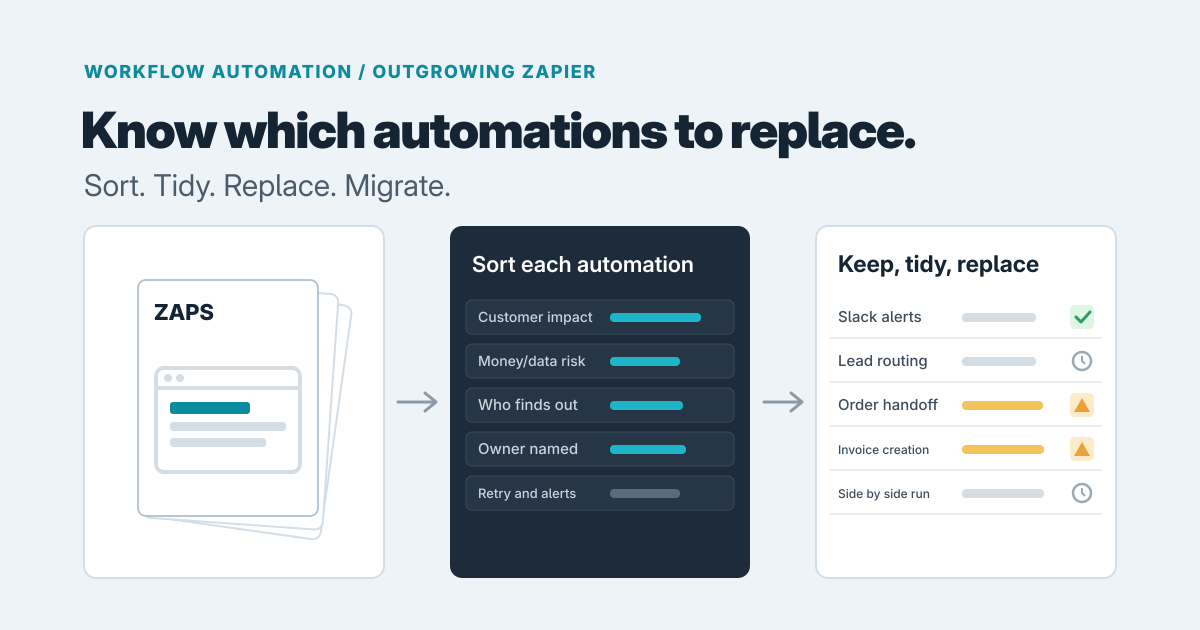
Don't ask "is Zapier good enough?" Ask, for each automation: what happens if this silently stops for three days? Your answer depends on customer impact, money or data impact, and who finds out.
- Keep the ones where someone mildly inconvenienced notices eventually. Internal notifications, convenience syncs, a Slack alert for a new form submission. Leave them alone.
- Tidy the ones where a failure costs time but you'd catch it with an alert, an owner and documentation. A lead-routing Zap often lands here if a missed lead would be noticed within a day.
- Replace the ones where a failure touches a customer, money or the only copy of some data, and where you'd learn about it late. Order handoffs and invoice creation are typical candidates. A process that scores badly on all three belongs here no matter how nicely it runs today.
Three paths, and what each trades off
Tidy in place. Zapier's custom error handling can run an alternative workflow when a step fails, so we'd start by setting one up to notify a named person for each important Zap, then write down what each Zap does and give each critical one an owner. It's cheap, quick and often enough. The tradeoff is that you're still bound by the platform's replay rules and the visibility it gives you. Choose this when the processes are mostly low or medium risk and the main problem is that nobody is watching.
Move to another automation platform. This beats tidying when the pain is the platform itself: the way you pay for steps no longer fits your volume, the builder can't express a pattern you need, or the connectors you depend on are better supported elsewhere. It beats a custom build when the process is still a fairly straight chain of apps and the flaw is tooling rather than the shape of the work. The tradeoff is that you rebuild the same logic somewhere else and need to assess whether the new platform gives your team the visibility and recovery the process requires. Before committing, ask each candidate who is told when a step fails and how fast, whether you can fix the cause and resume that one item, and whether a non-builder can read the flow. Check current limits and pricing with each vendor rather than trusting a comparison article.
Build custom workflow software. Justified when the process is central to how you operate, has real exceptions, and needs to show where every item stands. The tradeoff is that you now own software. That is a fair price for a critical process and a poor one for a Slack alert.
What a custom replacement should do
The reason to build is rarely a missing connector, and a platform move with better alerts can cover some of this. Here is what we'd put in the brief for a custom build.
First, a record of its own: each order, application or invoice becomes an item with a visible status, such as waiting, done, failed or stuck, so anyone can look it up instead of reconstructing history from run logs. Second, an exception route: when a step fails, the item lands in a queue with an owner and the context to fix it, instead of a silent stop or a late email. Third, recoverability: the software stores what already happened, so you can fix the cause and resume that one item without guessing or duplicating work.
That emphasis on a visible exception and a verified outcome also appears in OpsPilot's supervised operations workflow. One lesson from the project is that a receipt showing an action was attempted isn't proof the intended outcome happened: failed verification stays visible and escalates. OpsPilot's public demo uses synthetic records and connector effects, so this is a design lesson, not evidence of production results.
That is what we mean by observable, recoverable workflows in our workflow automation work. Our piece on CRM and accounting integration shows the same ideas applied to one common handoff.
We won't quote a price here, because it depends on the things that actually vary: how many exceptions the process has, how many systems it touches, how much of the history has to be reviewable, and who needs to use the queue. That's why we'd scope one critical process first rather than everything.
Migrating without a gap
Run old and new side by side. Start with an automation that's low-risk but real, so you learn how the new setup behaves under actual traffic without betting the business on it.
During the overlap, have both versions process the same incoming items, but let only one take effect, usually the old one at first. Compare the same few things for each item: whether it was created in the destination system, the key fields (amounts, recipient, status), and whether anything was skipped or done twice. Run the overlap until the new version has handled a full cycle of your real work, including a month-end or busiest day if the process has one, with no unexplained differences. Then switch the old one off, but leave it intact and disabled for a few weeks so you can turn it back on if something unexpected turns up.
Move the most critical process second or third, once you trust the pattern. If the process is tangled, our guide to modernizing a legacy workflow gradually describes the same one-seam-at-a-time approach.
Deciding, and when a review is useful
If you have a handful of automations and most are convenience, tidy them and move on. If two or three carry customer or money risk, those are your replacement candidates.
If you can't tell which is which, or you're unsure whether a platform move would just relocate the problem, decide what evidence you need before committing to a rebuild or custom work. A focused review can map the important automations, identify failure and ownership gaps, and recommend what to keep, tidy or replace. We cover when that's worthwhile in paying for a software consultant first, and our software consulting engagements are built for exactly this kind of decision.
If you'd like to talk through a specific set of automations, get in touch. We'll tell you plainly if tidying is all you need.
Prepared with AI-assisted research and writing, with automated editorial checks before publication.