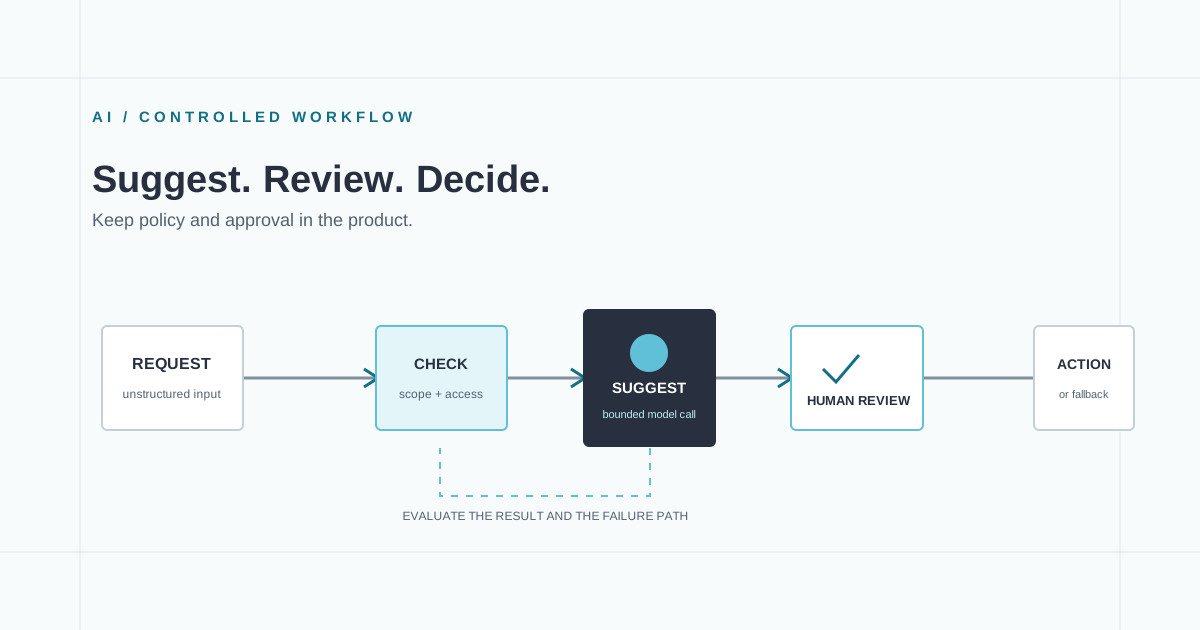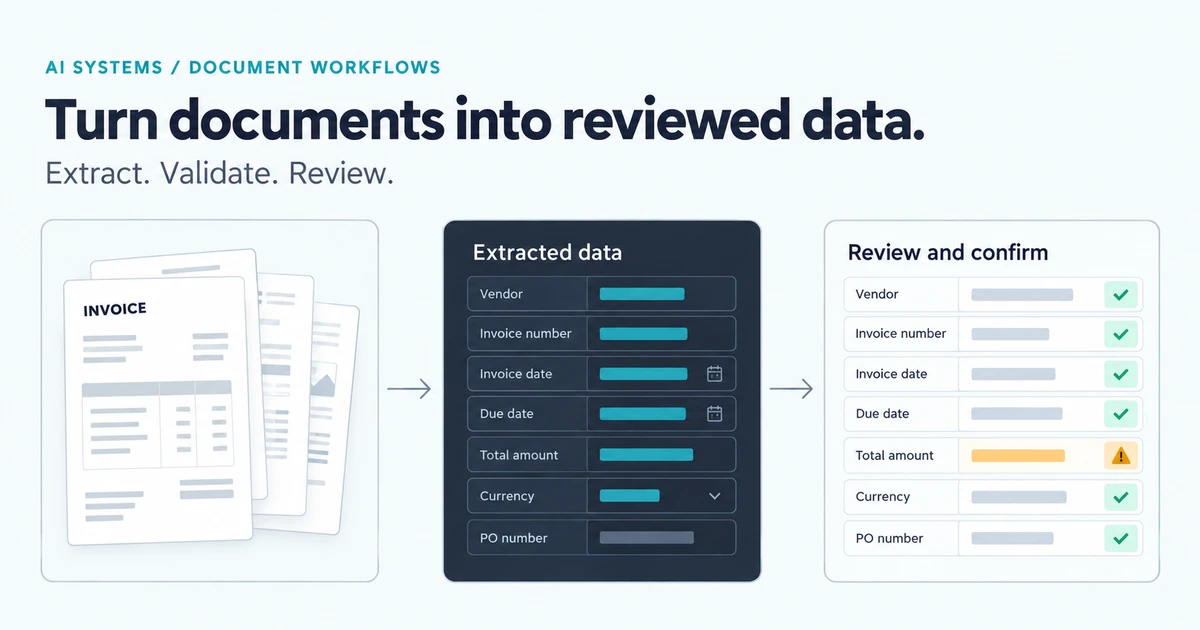

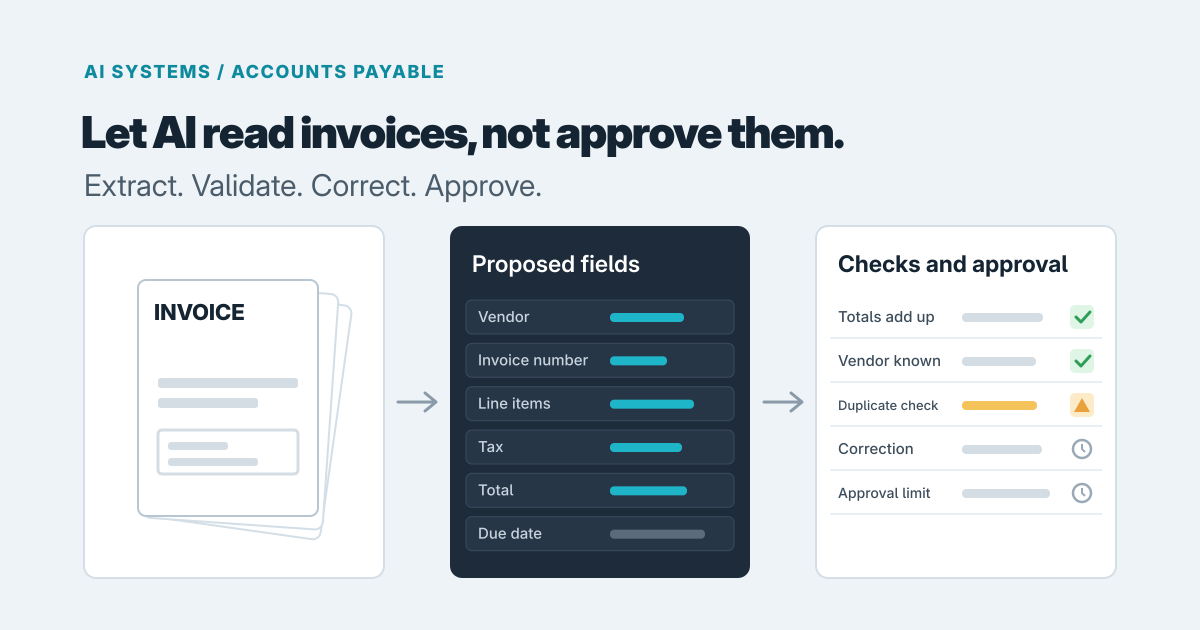
AI should read your invoices. It shouldn't decide whether to pay them. That one split explains most of what separates a useful accounts payable workflow from an expensive mistake: the model turns a messy PDF into proposed fields, and ordinary, boring rules decide whether those fields are trustworthy and who gets to approve the payment.
If you're a controller, an AP lead or a bookkeeping firm owner weighing a capture tool against a custom build, the question isn't "how accurate is the AI?" It's "what happens when it's wrong?" Models will occasionally misread a total, swap a vendor or miss a line. A good system makes that cheap to catch.
Start with the tools you already have
Before commissioning anything, try what's in your accounting software. Intuit describes QuickBooks Online as pulling details from emailed or uploaded invoices into pre-filled bills, with the line "You review, save, and pay" (QuickBooks Bill Pay). Xero's capture tools extract details such as supplier, amount, invoice number and due date into a draft transaction you check, with the original document attached (Xero). Bill.com describes duplicate-invoice checks, approval policies based on approvers and dollar amounts, and a second approval with dual control (BILL payment approvals).
Those are vendor descriptions of features, not measurements of how well they work, and third-party reviewers disagree about how deep QuickBooks line-item capture goes. So test with your own invoices. Run a few dozen real ones through the trial, including your ugliest vendors, and see what a person still has to fix.
For a modest volume, a single approver and invoices where header-level data (vendor, number, date, total) is enough, the built-in tools are probably all you need. Buying or building more would be waste.
We'd start looking beyond them when you see signs like these:
- You need line-item detail coded to accounts, jobs or projects, and staff retype it.
- Approval depends on more than the total: vendor, project, GL code or department.
- You need purchase order matching, or work across multiple entities.
- Someone asks "who approved this and what did they see?" and the answer takes an hour to reconstruct.
- A bookkeeping firm needs the same flow across many clients with different rules.
What the model proposes, and what rules own
The model is good at interpretation: finding the vendor name on a layout it has never seen, reading a due date, pulling out line items. That's the work people hate doing by hand.
Everything that must be right every time belongs in plain code that behaves the same on every run:
- Arithmetic. Do the lines add up to the subtotal, and does subtotal plus tax equal the total? A model can read numbers; it shouldn't be trusted to vouch for them.
- Duplicates. Vendor plus invoice number is the baseline, but exact matches miss resubmitted or slightly retyped invoices. One secondary source notes that duplicate payments come from resubmissions, inconsistent naming and manual entry errors (FitSmallBusiness). So also flag the same vendor, near-identical amount and nearby date.
- Vendor checks. BILL's own guidance says to pay only vendors already in the system and treat an invoice from an unknown vendor as an immediate red flag (BILL). That's a lookup, not a judgment call for a model.
- Approval limits. Who may approve what amount is policy. It should live in your application, not in a prompt.
This is the same boundary we describe in where AI fits in an internal workflow, and it matches the advice for AI document processing more broadly: validated fields, then a review queue.
Design the exception queue as three different actions
When a check fails or the model is unsure, the invoice shouldn't go to "someone." It should land in a queue with a clear owner, the original document beside the extracted values, and the reason it was flagged.
The design choice that matters most is keeping these as separate actions:
- Correction: fixing a misread field. The reviewer changes a value and the system re-runs the rules on it.
- Exception handling: deciding what to do with a flagged problem, such as a suspected duplicate or an unknown vendor, with a recorded reason.
- Approval: authorizing payment of the obligation.
When these collapse into one "looks good" button, a person who fixed a number is effectively also vouching for it, and the trail shows only that someone clicked. Separate actions give you separate roles and separate log entries.
Keep the submitter away from approval
The person who enters or corrects an invoice shouldn't be the person who approves it. That's our recommendation as a basic control, and it's easy to enforce in software and hard to enforce by habit. Worth noting: BILL's older approvals page says administrators can pay unapproved bills as long as required approvers are assigned, so check how any tool handles administrator overrides against your own policy.
Also keep the basis of each decision: the original invoice, what the model proposed, what was corrected, which rules fired and who approved under which policy. Months later, that's what turns an audit question into a two-minute lookup.
What this looks like in practice: InvoiceIQ
When we built InvoiceIQ, our accounts payable software with AI extraction and reviewed approvals, the principle was to let the model propose structured fields and evidence while server rules control arithmetic, validation, permissions and state changes. We kept correction, exception disposition, submission and assigned review as distinct steps, and a submitter can't approve their own invoice. Reviewers keep the original document, extraction provenance, accepted corrections and audit events, so they can follow how a record reached its final state.
Its limits matter for your decision. OCR and model output can be wrong, which is why the correction path exists. Purchase order matching is two-way only, and goods receipts, bank payments and ERP posting are outside what's implemented. Business access is arranged directly with us, and the public demo uses synthetic records.
Scoping a first release
Pick one invoice type and one approval path. For example, recurring supplier invoices under a single approver with one escalation above a limit. Test against a real sample of your invoices before anyone writes the approval logic, and keep your accounting system as the place payments are recorded.
We can't give honest numbers without seeing your invoices, but cost and timeline are driven by:
- how many invoice formats and vendors you have
- how many approval paths and exceptions exist
- which systems it must connect to
- how much testing against real documents you want before go-live
If you're unsure whether a built-in tool is enough, a short software consulting engagement can settle that before you commit. If you already know the review workflow is the gap, our AI development work covers exactly this kind of model-plus-rules system, and you can get in touch with a few sample invoices and a description of how approval works today.
Prepared with AI-assisted research and writing, with automated editorial checks before publication.